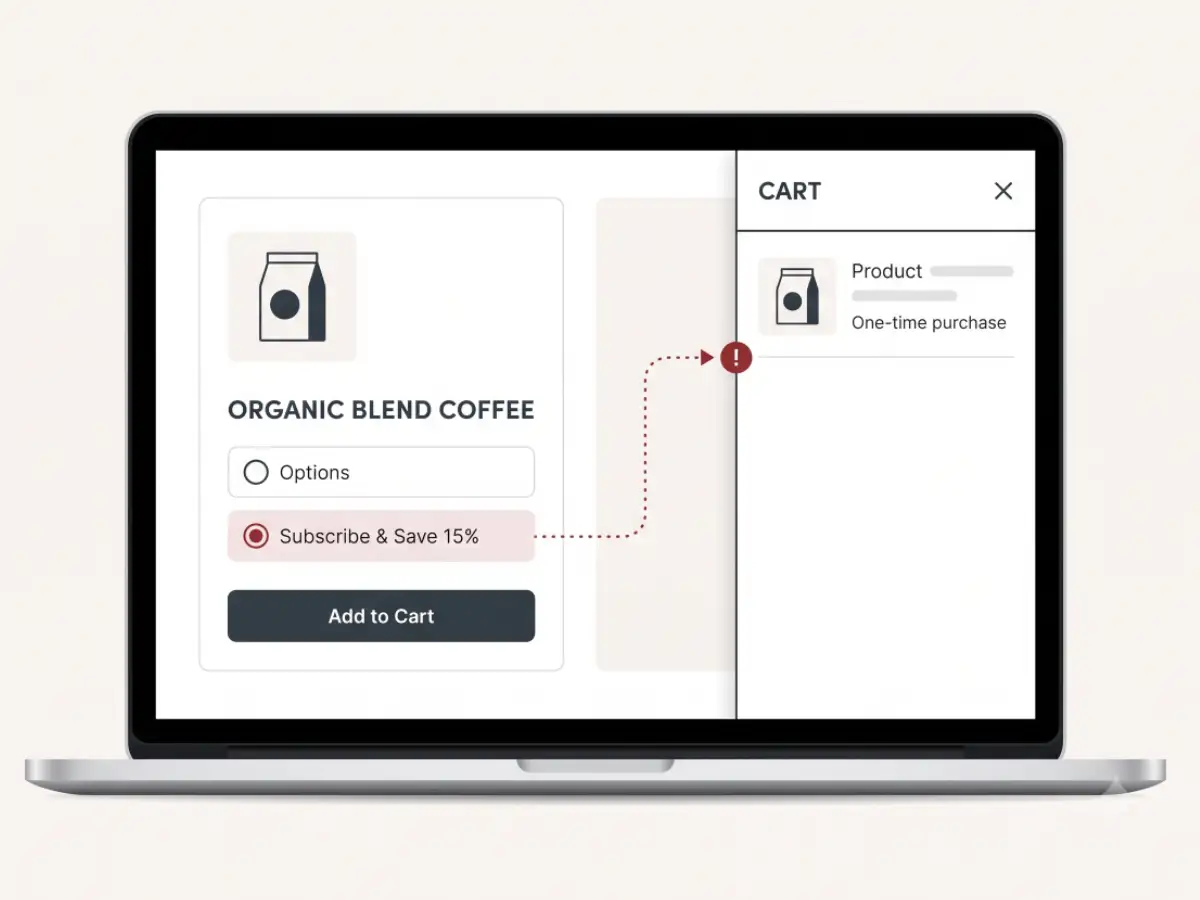
The short version
If subscriptions are adding as one-time purchases, the usual causes are:
- The selling plan input never makes it into the product form.
- The subscription widget renders outside the form that actually submits.
- A variant change resets or disconnects the selected subscription plan.
- A sticky Add to Cart button submits a separate form without selling plan data.
- A cart drawer, bundle, or upsell app rewrites the line item as a one-time product.
- Old app snippets from a Recharge, Skio, Appstle, Loop, or Shopify Subscriptions migration are still competing with the current widget.
- The issue only happens on mobile because mobile uses different markup or a sticky purchase bar.
The important thing is to trace where the plan disappears. Guessing at the widget or swapping apps can make the storefront more fragile if the theme wiring is the real problem.
What the shopper and the merchant see
From the shopper's side, the product page may look normal. They select Subscribe & Save, see the subscription discount, choose a delivery frequency, and click Add to Cart.
The cart may still show the product. Checkout may still work. Nothing obvious has to break.
The problem shows up later: the order arrives as a one-time purchase, the customer is not created as a subscriber in the subscription app, or the expected recurring revenue never appears.
For the merchant, this can feel quiet and confusing. You may notice fewer new subscriptions in the app dashboard, a customer support message about a missing subscription, or a recurring revenue dip that does not match product page traffic. Because checkout still completed, the storefront can look healthier than it is.
How a subscription add-to-cart is supposed to work
A Shopify subscription add is just a product add with extra data attached. The extra data is the selling plan ID.
The shopper selects the product variant.
The shopper selects a selling plan in the subscription widget.
The product form submits the variant ID plus the selling_plan ID.
Shopify creates the cart line with the subscription plan attached.
The cart or drawer shows subscription details under the item.
Checkout carries the plan through so the order becomes recurring.
When the order comes through as one-time, one of those steps usually lost the selling plan.
Cause: the selling plan input never makes it into the product form
The subscription widget may show a Subscribe & Save option, but the visible widget is not enough. The selected plan has to become form data before the Add to Cart request is sent.
This often breaks when the widget renders outside the product form, when theme edits remove or rename the hidden selling plan input, or when the page has more than one product form and the widget updates the wrong one.
Common clues include:
This is why the app may not be the problem by itself. The widget can be doing its job visually while the theme form is not carrying the data.
Cause: variant changes reset or orphan the plan
Variant selectors can rebuild pieces of the product form. That is normal in many Shopify themes, especially when variants have different prices, images, inventory, or subscription eligibility.
The problem starts when a variant change rebuilds the form but does not reconnect the selected selling plan. The shopper may still see Subscribe & Save selected, but the form that submits no longer has the current plan ID.
Sticky Add to Cart bars create a similar risk. Some sticky bars submit their own form or button state. If that sticky form only knows the variant ID, it can add the product as one-time even while the main product form has the right subscription data.
If the issue appears only after changing size, flavor, bundle quantity, or frequency, this is a good place to look.
Cause: cart drawer or upsell app rewrites the line item
Modern Shopify carts are rarely just a cart page. Many stores use drawer apps, upsell engines, bundle logic, gift logic, free-shipping meters, or custom scripts that intercept add-to-cart behavior.
Those tools can be useful, but they need to preserve subscription data when they re-add, update, or replace cart lines.
A common failure pattern looks like this: the PDP sends the subscription correctly, then a cart drawer or upsell flow removes and re-adds the item without the selling plan. The final cart line becomes one-time even though the first Add to Cart action was correct.
This can happen with Rebuy, UpCart, bundle apps, quick-add buttons, custom AJAX cart scripts, or older cart drawer code. The right diagnosis checks the cart request and the cart state after each script touches it.
If your add-to-cart behavior also feels stuck or inconsistent, this overlaps with the broader cart-flow symptoms covered in the Add to Cart spinner guide.
Cause: app migration leftovers
Subscription migrations are delicate because both old and new systems may leave storefront code behind.
Moving from Recharge to Skio, Skio to another subscription app, Appstle to Shopify Subscriptions, or any similar setup can leave duplicate widgets, old snippets, hardcoded selectors, stale cart logic, or two systems trying to control the same form.
The result may not be a visible crash. It may be a quiet handoff problem: the new widget appears, but old code still listens for variant changes, rewrites cart lines, or removes the new selling plan.
I wrote about this kind of migration risk in the Recharge to Skio field note. The main lesson applies broadly: a migration is not done just because the new widget appears on the PDP. The full storefront flow still needs to be checked.
Cause: it only breaks on mobile
Mobile can have a different purchase path from desktop. The theme may show a sticky Add to Cart bar, a compressed subscription widget, a different variant picker, or a drawer that does not exist on desktop.
That means subscriptions can work perfectly in a desktop test and still fail for mobile shoppers.
Always test the subscription add on mobile separately. Do not assume the desktop flow proves the mobile flow.
What store owners can check first
You can do a few practical checks before editing the theme.
1. Test desktop and mobile
Add the same subscription product on desktop and mobile. Use the main PDP button and, if it exists, the sticky Add to Cart button.
2. Check the cart page, not just the drawer
Open the full cart page after adding the item. Look for Subscribe & Save, delivery frequency, or other subscription text under the line item.
3. Check the subscription app dashboard
Place a controlled test order if that is safe for your store. Confirm whether the subscription appears in the app dashboard, not just in Shopify orders.
4. Try a different product or template
If one product breaks and another works, the issue may be tied to variant setup, product template, selling plan eligibility, or custom content on that PDP.
5. Note whether the discount appears anywhere
If the discount shows on the PDP but disappears in cart, the selling plan may be getting lost after selection. If the discount never appears, the widget or plan setup may be failing earlier.
These checks will not fix the issue by themselves, but they make the next investigation much faster.
When to look closer, and how the Detox Scan helps
It is worth looking closer when subscription orders are quietly becoming one-time purchases, when the issue is inconsistent across devices, or when a recent app migration changed the product form, cart, or subscription widget.
Shopify Detox Scan can review the public storefront without admin access. It can see visible subscription widgets, product form clues, duplicate forms, app scripts, console errors, cart drawer behavior, and mobile-specific risk signals.
The scan is not a private app admin audit. It is a practical first pass to identify where the storefront appears fragile and whether a deeper cleanup or focused subscription debugging pass is worth doing.
What you can check yourself vs. when to get help
You can check whether the issue happens on desktop, mobile, one product, multiple products, the cart drawer, the full cart page, and the subscription app dashboard. You can also document the exact steps that turn a subscription into a one-time order.
It is worth having someone look closer when the behavior changes by device, variant, product template, cart drawer, or app state. Those patterns usually mean the storefront wiring needs to be traced rather than guessed at.
A careful fix should preserve the buying flow, protect existing subscribers, and avoid replacing one quiet subscription problem with another.
Subscription data should not disappear quietly.
If Subscribe & Save orders are arriving as one-time purchases, start with a Shopify Detox Scan and get a practical read on where the storefront handoff may be breaking.
Start with Shopify Detox Scan